Spot what’s playing
Current audio sources are separated from apps that made a brief notification sound.
 Audio FinderGet Audio Finder
Made for your Mac’s menu bar
See which app—or browser tab—is playing audio, then jump straight to it. Audio Finder checks output state without recording a thing.
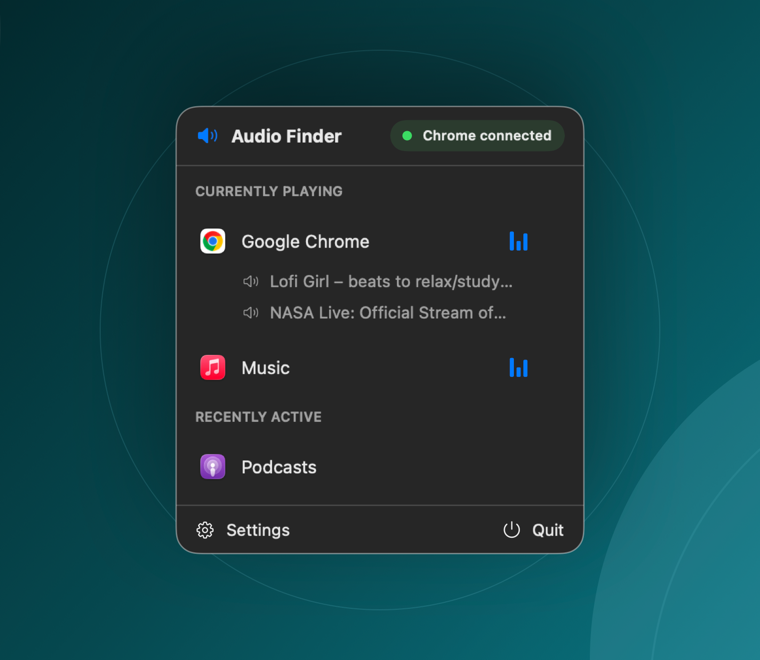
One click. Exact source.
Audio Finder sits quietly in the menu bar until sound is hard to place. Open it to see what is playing now and what stopped moments ago.
Current audio sources are separated from apps that made a brief notification sound.
Select a source and Audio Finder brings that app—or connected browser tab—to the front.
No mixer to manage and no recording timeline to inspect. Find it, switch to it, done.
Optional browser connector
Enable the companion extension to identify audible Chrome and Brave tabs. It reads only the title and identifiers of non-incognito tabs marked as audible, then sends them to Audio Finder over 127.0.0.1.
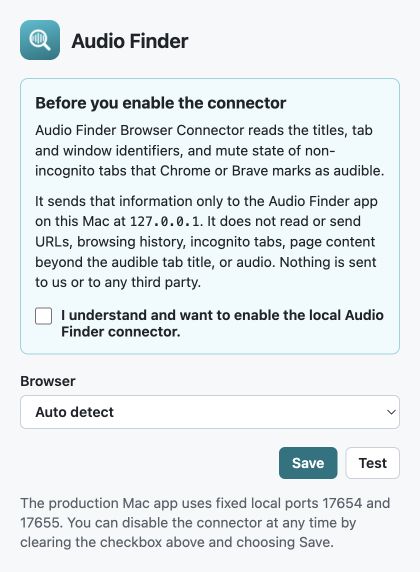
Private by design
Audio Finder uses a built-in macOS capability to see whether an app is using audio output.
It does not capture, save, upload, transcribe, or inspect audio content.
The optional connector talks only to the Mac app over your device’s loopback address.

Choose your download
The signed, notarized menu-bar app for macOS 14.2 or later.
Download Audio Finder 1.0.1 One universal download for Apple silicon and Intel Macs.Optional tab-level detail for browsers marked as audible by Chrome or Brave.
Get the browser connector Requires the Audio Finder Mac app.The Mac app and browser extension are available on GitHub. Explore the code, build them yourself, or contribute.
 View source on GitHub